

 By
By Introduction
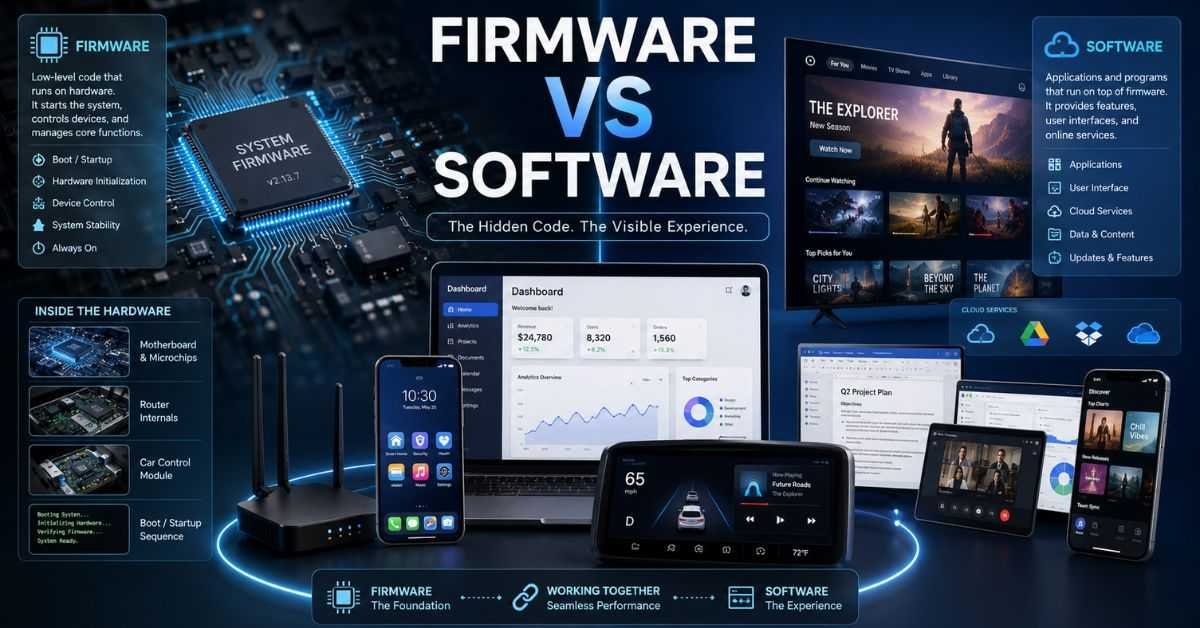
Every day in 2026, we rely on smart devices without thinking about what makes them work. We tap apps on our phones, stream shows on smart TVs, and drive cars filled with digital systems. But when we see messages like “system update” or “firmware upgrade,” many of us pause and wonder what they really mean. The confusion around firmware vs software is common, even among regular tech users.
Although these two terms sound similar, they serve very different purposes inside your devices. One works deep in the background, controlling the hardware itself. The other is what you see and interact with on your screen. Understanding this difference is not just for engineers or IT experts. It can help you troubleshoot problems, update devices safely, and better understand the technology you use every day.
In this guide, you’ll learn the real difference between firmware vs software in simple, clear language with practical examples from modern devices.
What is Software?
Software is a program or app that tells your device what to do. It helps you complete tasks like writing documents, browsing the internet, or playing games. If you’ve ever downloaded an app from the App Store or Google Play, you installed software.
Simple Examples
- Microsoft Word
- Google Chrome
- Zoom
- Video games
Software runs on top of your device’s operating system (like Windows, macOS, Android, or iOS). It is easy to install, update, or remove.
You can think of it like this:
Your device is a body. Software is the tools you use, like books, pens, or games.
Software is designed for users. It focuses on features, design, and ease of use. That’s why apps get updates often. Developers fix bugs, improve speed, and add new features. In 2026, most apps update automatically through the internet. Cloud-based apps are even more common now, meaning some programs run partly online instead of fully on your device.
What is Firmware?
Firmware is special software that lives inside hardware. It helps the hardware know how to work. Unlike regular apps, firmware is built into the device. It controls basic functions and starts working as soon as the device turns on.
For example:
- Your computer’s BIOS or UEFI
- Your Wi-Fi router’s internal system
- A smart TV’s internal control program
- A car’s engine control system
When you press the power button on your laptop, firmware starts first. It checks the hardware and prepares the system before Windows or macOS loads. You usually don’t see firmware. It runs quietly in the background.
If software is like tools you use, firmware is like the nervous system that makes your body move. In the discussion of firmware vs software, this is the biggest idea to remember: firmware controls hardware, while software helps users do tasks.
Firmware vs Software: Core Differences
Now let’s clearly compare firmware vs software in simple terms. Here are the most important differences:
- Firmware controls hardware directly.
- Software runs on top of the system and helps users.
- Firmware updates are rare.
- Software updates happen often.
- Firmware problems can stop a device from starting.
- Software problems usually affect only one app.
Think of a smartphone:
- Firmware helps the phone turn on and manage the battery.
- Software includes apps like WhatsApp and YouTube.
When comparing firmware vs software, the main difference is their role. One works deep inside the device. The other works on the surface where users interact.
Comparison Table: Firmware vs Software
Here is a simple side-by-side table to make things clearer:
| Feature | Firmware | Software |
| Where It Lives | Inside hardware (ROM/flash memory) | On hard drive or cloud |
| Main Purpose | Controls hardware | Performs user tasks |
| Update Frequency | Rare | Frequent |
| User Interaction | Minimal | High |
| If It Fails | Device may not boot | App may crash |
| Examples | BIOS, router system | Browser, games, office apps |
This table helps you quickly understand firmware vs software without technical confusion.
Real-Life Examples in 2026 Devices
Let’s look at how this works in real devices you use every day.
Smartphone
- Firmware: Controls camera hardware, battery, and boot process.
- Software: Apps like TikTok, Gmail, and Spotify.
Laptop
- Firmware: BIOS/UEFI starts the system.
- Software: Windows 12, Microsoft Excel, Chrome.
Smart Car
Modern electric cars in 2026 use advanced systems.
- Firmware: Controls engine, braking, and battery systems.
- Software: Navigation screen, music apps, voice assistant.
Wi-Fi Router
- Firmware: Manages internet traffic and security.
- Software: The web dashboard you log into.
These examples show how firmware vs software works together in every smart device.
How Updates Work
Updates are very different for firmware and software.
Software Updates
- Happen often
- Add new features
- Fix bugs
- Improve speed
- Usually automatic
For example, your phone apps may update weekly.
Firmware Updates
- Happen less often
- Focus on stability and security
- May require restarting the device
- It can be risky if interrupted
If a firmware update fails, it can “brick” a device, meaning it won’t turn on properly. In firmware vs software updates, software is safer and easier. Firmware updates must be done carefully.
Security Differences in 2026
Security is very important today. Cyber threats are increasing every year. Software can get viruses or malware through unsafe downloads. Antivirus programs usually protect against these threats. Firmware attacks are more serious. Hackers target low-level systems because they are harder to detect.
For example:
- Hacked router firmware can spy on internet traffic.
- A compromised car control system can affect vehicle safety.
That’s why manufacturers now use secure boot systems and digital signatures to protect devices. When thinking about firmware vs software security, firmware attacks are rarer but more dangerous.
Development Differences
The people who create firmware and software often have different skills. Here is a simple comparison:
| Area | Firmware Developer | Software Developer |
| Focus | Hardware control | User features |
| Programming Languages | C, C++ | Python, JavaScript, Swift |
| Memory Limits | Very strict | More flexible |
| User Interface Work | Rare | Common |
| Testing Tools | Hardware tools | Coding tools and simulators |
Firmware engineers must understand electronics and hardware deeply. Software developers focus more on user experience and design. This difference also explains why firmware vs software serve different purposes.
Common Myths About Firmware vs Software
Many people believe incorrect things about these terms.
Myth 1: They are the same.
They are related but serve different roles.
Myth 2: Firmware never updates.
In 2026, many devices receive secure firmware updates online.
Myth 3: Only computers use them.
Almost all smart devices use both.
Myth 4: You don’t need to care about firmware.
If it fails, your device may stop working completely.
Understanding firmware vs software helps you make smarter technology decisions.
Why This Difference Matters
You might wonder, “Why should I care?”
Here’s why:
- It helps you troubleshoot problems.
- You’ll know which updates are safe.
- You can better understand device performance.
- It improves cybersecurity awareness.
For example, if your app crashes, reinstalling software might fix it. But if your computer won’t turn on, the issue may be firmware-related.
In real life, knowing the difference between firmware vs software saves time and money.
The Future in 2026 and Beyond
Technology is becoming smarter every year.
In 2026:
- Smart homes are more common.
- Electric cars rely heavily on embedded systems.
- AI chips depend on advanced firmware control.
- Cloud apps continue to grow.
Devices now receive wireless updates for both system layers. This makes them safer and more powerful. As technology grows, the relationship between firmware vs software becomes even more important. They are not competitors. They work together.
FAQs
What is the simplest difference between firmware and software?
Firmware controls hardware, while software helps users perform tasks.
Can firmware be deleted?
Usually no, but it can sometimes be updated.
Is BIOS firmware or software?
BIOS is firmware.
Do smartphones use both?
Yes, every smartphone uses both.
Which is more important?
Both are important because they depend on each other.
Conclusion
Now you understand the real meaning of firmware vs software. Firmware lives deep inside your device and controls the hardware. Software sits on top and helps you complete tasks like browsing, gaming, or working. Firmware updates are rare and critical. Software updates are frequent and user-focused. Both are essential for modern devices in 2026.
The next time your phone updates or your laptop restarts, you’ll know what’s happening behind the scenes. If you found this guide helpful, share it with someone who is confused about firmware vs software and help them understand technology in a simple way.